Choose a Bluetooth car adapter by the input your stereo can actually use. A working AUX socket can take audio from a Bluetooth receiver. With an FM radio but no suitable AUX input, a compatible Bluetooth FM transmitter offers another route. A USB socket alone does not establish compatibility: it may supply power without accepting the adapter’s sound.

The useful question is not which adapter has the largest Bluetooth version number. It is whether your phone, the adapter and the car form a complete audio path. This guide compares those paths and the checks worth making before buying. The named products are documented examples, not a tested ranking.
Start with the car’s connections
While safely parked, check the stereo’s source menu and the vehicle handbook as well as the sockets. Write down the car’s year, stereo model where identifiable, available inputs and socket locations. A seller can answer a specific compatibility question much more usefully than “Will this work in my car?”
| Your car has | Route to investigate | Check first |
|---|---|---|
| Working Bluetooth audio already | Use the existing system if it meets your needs | Test music and calls separately before buying extra hardware. |
| A 3.5 mm AUX audio input | A Bluetooth audio receiver with an analogue output | Confirm the input works, the plug fits and there is suitable power or a rechargeable battery. |
| FM radio and a suitable accessory power socket | A Bluetooth FM transmitter | Confirm power requirements and that radio and transmitter can use the same available frequency. |
| USB, with no confirmed AUX input | Check the handbook and adapter’s exact USB requirements | Do not assume a general USB Bluetooth dongle will work with the stereo. |
AUX receiver or FM transmitter: what changes?
An AUX receiver sends sound through a cable
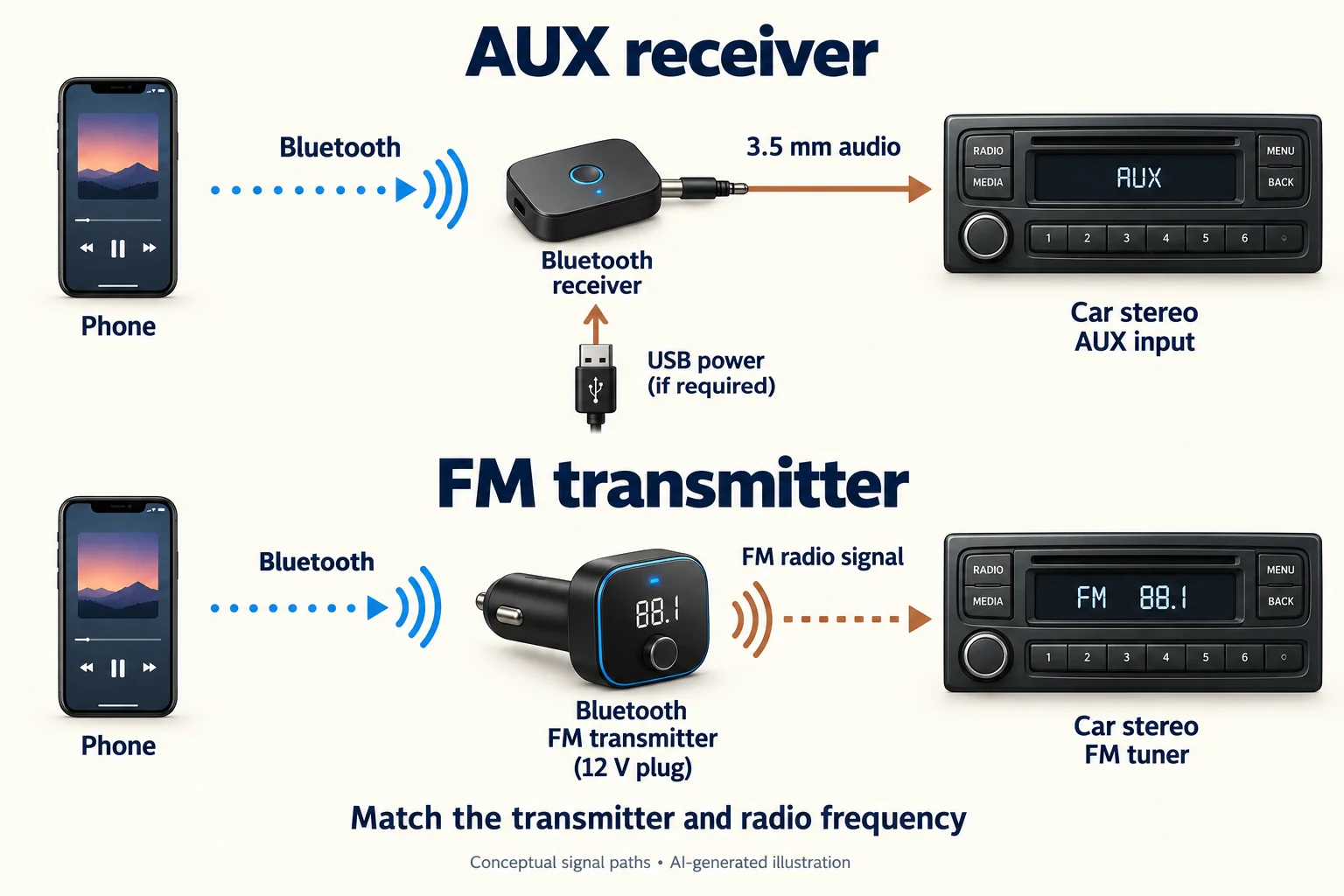
The phone sends audio wirelessly to the receiver, which feeds the stereo’s AUX input through a 3.5 mm connection. The stereo must be on its AUX source. This arrangement avoids sending the last part of the signal over FM, although it does not guarantee a particular sound quality or eliminate every possible noise problem.
The receiver needs its own power. Some have a rechargeable battery; others take power continuously from USB. On UGREEN’s documented USB-powered AUX design, USB supplies power and the 3.5 mm plug carries audio. Plugging in only the USB end leaves that audio connection unfinished.
An FM transmitter sends sound to the radio
The phone pairs with the transmitter, which broadcasts the audio over a short FM link. Tune the car radio and transmitter to the same suitable frequency. Nulaxy’s manufacturer guidance explains matching an unused frequency, with a UK/EU tuning range of 87.5–108.0 MHz. Follow the particular model’s controls; there is no universally clear frequency for every location.
Read socket labels carefully. Nulaxy identifies some units with AUX IN for connecting an audio player to the transmitter. That does not make the socket an output to the car’s AUX input. A familiar connector shape can serve the opposite direction.
RX, TX and USB: three labels that prevent wrong purchases
RX means receiving; TX means transmitting. To receive your phone’s Bluetooth audio and feed an AUX input, you need the receiving function. A transmitter designed to send a television’s sound to Bluetooth headphones does a different job. For a combined RX/TX device, check both the selected mode and which physical socket is its input or output.
USB power is not the same as USB audio. Do not infer stereo support from the fact that a device lights up. A port might charge a phone or read certain media without supporting a separate Bluetooth accessory. Ask the stereo or adapter manufacturer about the exact combination if its documentation is unclear.
Bluetooth audio is not phone projection. An AUX receiver or FM transmitter does not, by itself, add apps, maps or an interactive phone interface to the dashboard. If that is your aim, read our CarPlay and Android Auto guide before buying an audio-only accessory.
USB-powered and rechargeable examples
The following UK manufacturer listings illustrate the power choice. Check the model identifier as well as the listing title, because similar product names can cover different designs.
- UGREEN SKU 70601: the USB-powered car AUX adapter has a 3.5 mm connection and built-in microphones. Its layout needs both an audio input and a suitable power connection within reach.
- UGREEN SKU 90748: the rechargeable AUX receiver uses a battery. UGREEN advertises 15 hours of use after a two-hour charge; that is the manufacturer’s claim, not our measured result. Consider when and where you would recharge it.
These examples establish different arrangements, not a winner for call quality, reliability or value. A product fitting the sockets is the start of the decision, not evidence that every advertised feature will behave as you expect in your car.
What to compare after compatibility
- Physical fit: check the space around the accessory socket and AUX port. A broad adapter body could cover a neighbouring control or make a storage compartment awkward to close. Measure before ordering.
- Power routine: decide whether you prefer a charging task or an occupied USB socket. Check the car’s handbook for how its sockets behave after switching off. Nulaxy warns that some accessory sockets stay powered and recommends unplugging its transmitter after use in that situation.
- Microphone: check whether calls are supported and where the microphone sits. A music-only success does not demonstrate that the other caller can hear you clearly. Plan a parked test with a willing caller.
- Reconnection: ask whether the unit starts and reconnects automatically, needs a button press or remembers several devices. Check what happens when both regular drivers’ phones are nearby.
- Controls: list the functions you need: volume, track selection, answering or ending a call. Ask explicitly about existing steering-wheel controls rather than assuming an AUX connection preserves every feature.
- Returns and support: keep the exact listing, model identifier and written compatibility answer. Check the seller’s return conditions before buying so an unsuitable fit is easier to resolve.
Make these requirements part of your car equipment checklist too. When comparing cars, confirm what the installed stereo does; a generic equipment description can leave your most-used function unanswered.
Test the setup while parked
Set up pairing, sound levels and any FM frequency before driving. GOV.UK’s device-use guidance explains that holding and using a phone is prohibited while driving, including when stopped at traffic lights or in a queue, subject to specified exceptions. Hands-free equipment does not remove the duty to stay in control, and a device must not obstruct your view.
Do not treat “hands-free” on a product box as a promise that every interaction is appropriate on the move. If a connection needs attention during a journey, leave it until you can park safely.
The phone says connected, but there is no sound
Trace one link at a time: which device is the phone using, is the receiver powered, and is the stereo on the intended AUX or FM source? For AUX, check that the audio cable is connected as well as any USB power lead. Consult the model’s manual before changing unfamiliar settings.
The FM connection has static or another station cuts in
While parked, check that the radio and transmitter frequencies match, then follow the manual to choose an unused frequency. Do not keep retuning while driving. If interference remains unacceptable, reconsider the available audio route rather than assuming a different Bluetooth version alone will fix the FM link.
Music works, but calls or reconnection do not
Check that the exact model supports the missing function. Note which phone connects, whether another paired phone is nearby, and whether a restart changes the behaviour. Use the manufacturer’s pairing procedure; Nulaxy provides model-specific help through its manual library. Record the sequence that fails before contacting support.
A short acceptance checklist
Before settling on an adapter, confirm these points in your own parked car:
- Music plays through the intended speakers using the expected stereo source.
- Any required calling function works in both directions.
- The unit reconnects in a way both regular drivers understand.
- Its body and cables leave controls, storage and your view unobstructed.
- You know the shutdown or charging routine and have retained the correct manual.
Keep your compatibility notes and the correct manual with the purchase record. They give you a useful starting point if the setup changes or you need support.